Ballooning software
Most drawing-ballooning tools are built for Windows and many of them for the cloud. DrawingStamp Pro takes the other road: it runs natively on Windows, macOS and Linux, and your technical drawings never leave your machine — which matters when they are under NDA.
What it does
DrawingStamp Pro reads technical drawings, detects dimensions, tolerances, GD&T frames and surface finish callouts, and places sequentially numbered inspection balloons — turning a PDF or a scanned TIFF into a first-article inspection plan in seconds. The characteristic list exports to Excel for your FAI report, PPAP documentation or CAQ system.
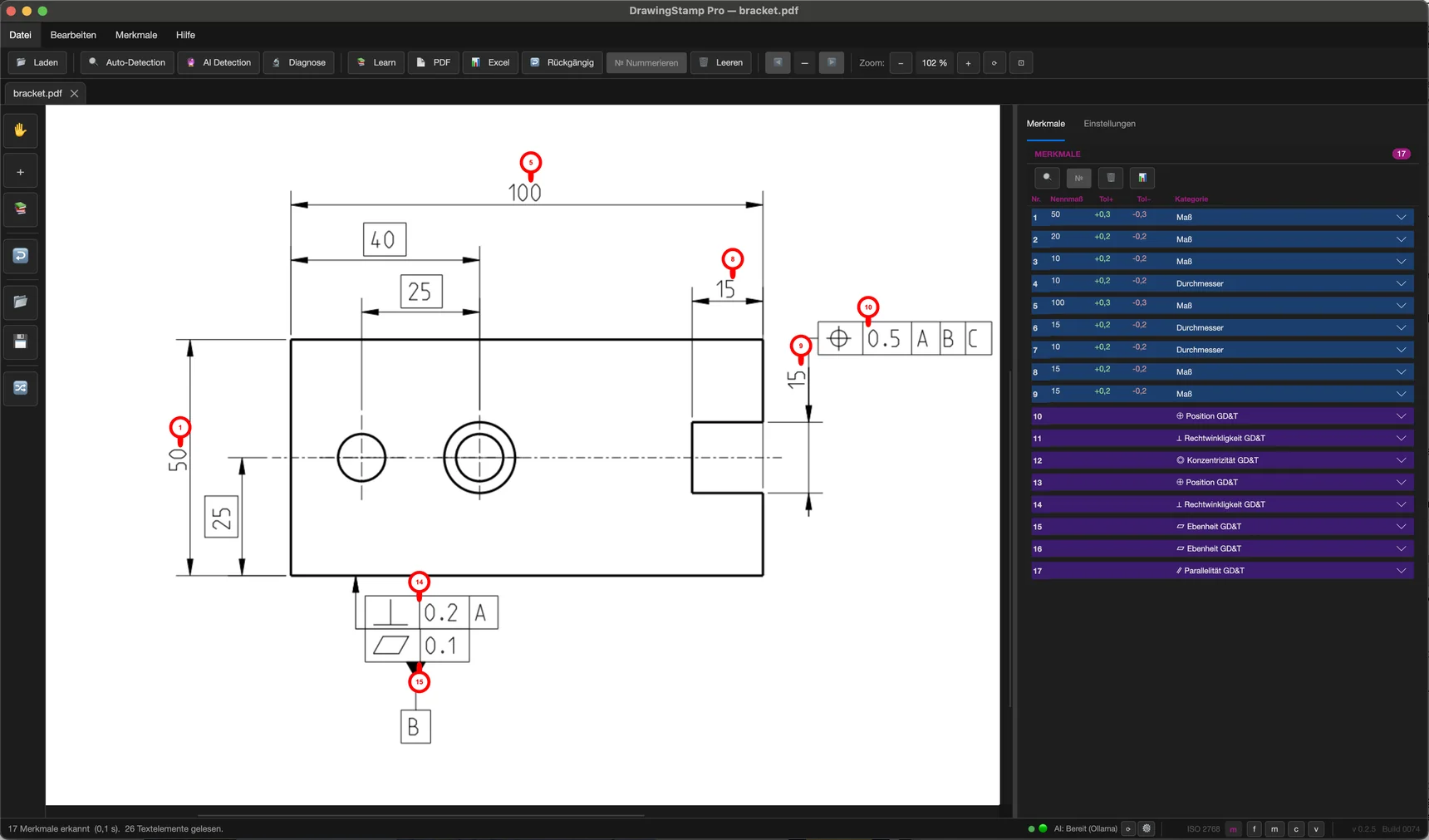
Detected automatically, numbered sequentially
On vector drawings from CAD, DrawingStamp Pro finds most of the inspection-relevant characteristics automatically; you add the rest with two clicks. On scanned drawings it finds considerably less — the built-in OCR helps, but expect more manual rework there.
Local by design
Detection, stamping and export run entirely on your computer. There is no upload, no account, no processing on someone else's server — the internet connection is used only for the update check and licensing. Optional AI assistance is local by default; a cloud AI service is contacted only if you configure one yourself with your own key, and even then it receives text snippets, never the drawing.
| Platform | Requirements |
|---|---|
| Windows | Windows 10 or 11 (64-bit), delivered as an installer (.exe) |
| macOS | macOS 14 (Sonoma) or newer on Apple Silicon (M1 or later), delivered as a ZIP archive; Intel-based Macs are no longer supported |
| Linux | 64-bit distribution with a desktop, e.g. Ubuntu 22.04, Debian 12 or Fedora 42 and newer (glibc 2.27+), delivered as .tar.gz |
| Formats | PDF and TIFF (bundled OCR for scans); DWG and DXF import without a CAD installation |
| Optional local AI | Not required for detection; running the optional AI locally needs Ollama plus correspondingly capable hardware — plenty of RAM and ideally a dedicated graphics card |
FAQ
Does it really run without a cloud connection?
Yes. Detection, stamping and export run entirely on your machine — drawings are never uploaded. Internet is only used for the update check and licensing. Optional AI runs locally by default; a cloud AI service is only contacted if you explicitly configure one with your own API key, and even then only text snippets are transmitted, never the drawing itself. Running the AI locally does call for correspondingly capable hardware — the rule-based detection itself is fine on an ordinary office PC.
Which file formats can it open?
Vector PDFs are read directly; scanned PDFs and TIFF files are prepared by the bundled text recognition. DWG and DXF drawings can be imported without any CAD installation — with CAD import the dimension texts come straight from the file; the model space is read, and symbols from CAD-specific fonts may be missing. PDF and TIFF are the proven route.
Does it run on Apple Silicon Macs?
It runs on Apple Silicon Macs only. The macOS build is built for Apple Silicon (M1 or later); Macs with an Intel processor are no longer supported.
What does it cost?
Licensing is per workstation; the price is available on request. Beta participation is free, and a time-limited, watermarked test license lets you evaluate the software with your own drawings. Just ask — you will get a concrete answer.
Get started
The beta is free, runs on all three platforms and updates itself. The app interface is available in English and German.
